forked from freewayz/pythonVSCode
-
Notifications
You must be signed in to change notification settings - Fork 0
Expand file tree
/
Copy pathparams.json
More file actions
6 lines (6 loc) · 5.02 KB
/
Copy pathparams.json
File metadata and controls
6 lines (6 loc) · 5.02 KB
1
2
3
4
5
6
{
"name": "Python for Visual Studio Code",
"tagline": "Python extension for Visual Studio Code",
"body": "### Welcome to Python for Visual Studio Code\r\n\r\nPython for Visual Studio Code is an extension for Visual Studio which aims at providing you with the best python development environment and experience possible. The extension is built for the Visual Studio Code IDE that is built from the ground up using Open Source technologies such as NodeJs.\r\n\r\n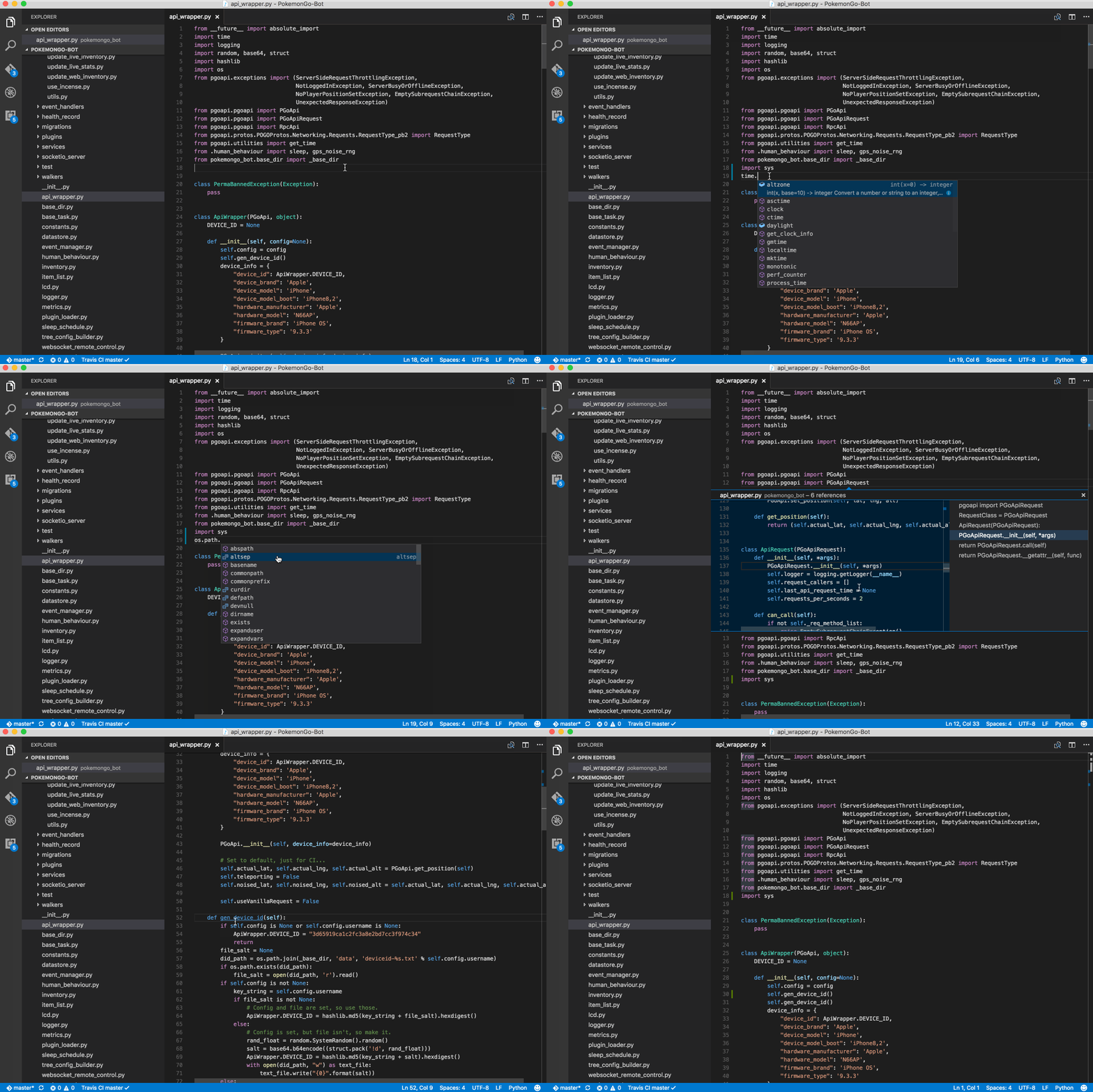\r\n\r\n\r\n\r\n### Open Source and Cross Platforma\r\nThe extension along with the IDE is both open source and runs on multiple platforms such as Windows, Mac and Linux.\r\nBoth the [Python extension](https://github.com/DonJayamanne/pythonVSCode) and [Visual Studio Code](https://github.com/Microsoft/vscode) are built using open source technologies such as NodeJs.\r\n \r\n## Works out of the box\r\nOnce installed, the extension works out of the box with absolutely no configuration.\r\nThis is made possible by using the default Python interpreter available in the current PATH variable on the operating system.\r\n\r\nIf necessary, the python interpreter being used by the extension could be changed to point to a specific version of the interpreter (or one that is in a specific virtual environment). This is made possible by altering the following setting in the [User or Workspace settings file](https://code.visualstudio.com/Docs/customization/userandworkspace):\r\n```json\r\n“python.pythonPath” : “<fully qualified path to the python interpreter>”\r\n```\r\n\r\n## Features\r\n\r\n### Virtual Environments\r\nPython virtual environments are completely supported. \r\n\r\n### Rich Intellisense (code completion)\r\nThe extension provides a very rich set of intellisense and code completion capabilities. This significantly reduces the development effort by removing the guess work from the equation. Intellisense (code completion) works out of the box with no additional configuration. However, this can be fined tuned if necessary.\r\n\r\n### Code Navigation and the like\r\nThe extension integrates with most if not all of the code navigation capabilities exposed by the Visual Studio Code IDE. What this means to the end user is simple, features such as Go to Definition, Go to Symbol, Find all References, hover over a symbol to view the documentation, etc. are available to the user through the IDE via standard commands and interfaces. \r\nThis alone feature alone saves development time and effort with improved code navigation.\r\n\r\n### Linting\r\nThe extension utilizes some of the best and most popular python linters in order to analyze the source code and provide feedback to the user. Popular linters such as Pylint, Flake8, pydocstyle, and the like are used. As a user you could either use all of them or just one or none. Users have the ability to fine tune each linter placing relevant configuration files in the project directory.\r\n\r\n### Code formatting\r\nCode formatting ensures your code meets certain standards of coding styles. This capability is provided by using either one of Yapf or AutoPep8 library. Using this feature you can be assured your code meets some of the best known standards in python coding (format) styles.\r\n\r\n### Debugging\r\nThe debugging experience provided is unparalleled. You could debug almost any type of application, web and console applications, local and remote applications (yes remote debugging too). The debugger provides a rich set of debugging capabilities such as:\r\n* Multi-threaded debugging\r\n* Local variables and arguments \r\n* Watch window and stack trace\r\n* Conditional breakpoints\r\n* Evaluating expressions \r\n* and more\r\n\r\n### Miscellaneous features that make this a great Python development IDE\r\n* Executing unit tests\r\n* Rename refactor\r\n* Sort imports within a python file\r\n* Auto-indenting as you type\r\n* Total control over the linters and formatters used\r\n\r\n### Creating pages manually\r\nIf you prefer to not use the automatic generator, push a branch named `gh-pages` to your repository to create a page manually. In addition to supporting regular HTML content, GitHub Pages support Jekyll, a simple, blog aware static site generator. Jekyll makes it easy to create site-wide headers and footers without having to copy them across every page. It also offers intelligent blog support and other advanced templating features.\r\n\r\n## Contributions and Suggestions\r\nIf you have an idea, we’d love to hear about it, you can add them [here](https://github.com/DonJayamanne/pythonVSCode/issues/183).\r\nIf you think you can build it, then by all means fork the repo, make the changes and create a pull request.\r\n\r\n## License\r\n[MIT](https://raw.githubusercontent.com/DonJayamanne/pythonVSCode/master/LICENSE)\r\n",
"note": "Don't delete this file! It's used internally to help with page regeneration."
}